
Why your Kubernetes upgrade gets stuck during node drain
Distinguish rejected eviction, pending replacement, and slow termination, then find the narrowest safe correction for a blocked maintenance operation.

Can this node drain?
Change the health snapshot and see the budget respond.
Eviction blocked by budget. 0 voluntary evictions available in this simplified snapshot.
A blocked drain is often protecting something
A node upgrade pauses because a pod will not leave. The maintenance command retries eviction, the application dashboard looks mostly healthy, and the tempting response is to force the pod away. Before changing anything, establish what is blocking the operation and which service condition the block is protecting.
This guide uses a hypothetical three-replica API during planned node maintenance. It is an operating example, not a report of customer downtime. Kubernetes documents PodDisruptionBudgets, eviction behavior, and drain controls. The diagnostic order and maintenance checklist here are worqcloud recommendations for applying those controls.
A PodDisruptionBudget, or PDB, constrains supported voluntary evictions. It does not create replicas, provide spare nodes, or prevent every disruption. The immediate goal is to identify whether the drain is waiting on availability, scheduling, pod termination, or a different workload condition.
Start with the pod and the eviction message
Identify the node, namespace, pod, and owning workload from the drain output. Keep the exact error and observation time. A message about a disruption budget points at a different investigation from a warning about unmanaged pods, local storage, or a container that is still terminating.
Inspect the workload and PDB together. Confirm that the budget's selector actually matches the pods you intend to protect. A selector that includes unrelated pods, or excludes a service replica, can make the displayed numbers difficult to interpret. Labels and ownership are evidence, not details to guess from a familiar service name.
Use read-only inspection first. Look at pod readiness, deployment replica counts, PDB status, recent events, and replacement-pod scheduling. The node being drained is only part of the system. The reason the pod cannot safely leave may be on another node or in a dependency that prevents a replacement becoming ready.
Read the budget against current health
Consider the illustrative API with three desired replicas and a budget requiring two available replicas. When all three are healthy and other relevant status conditions agree, the budget can permit one voluntary eviction. After that eviction, another must wait until the workload has enough healthy capacity again.
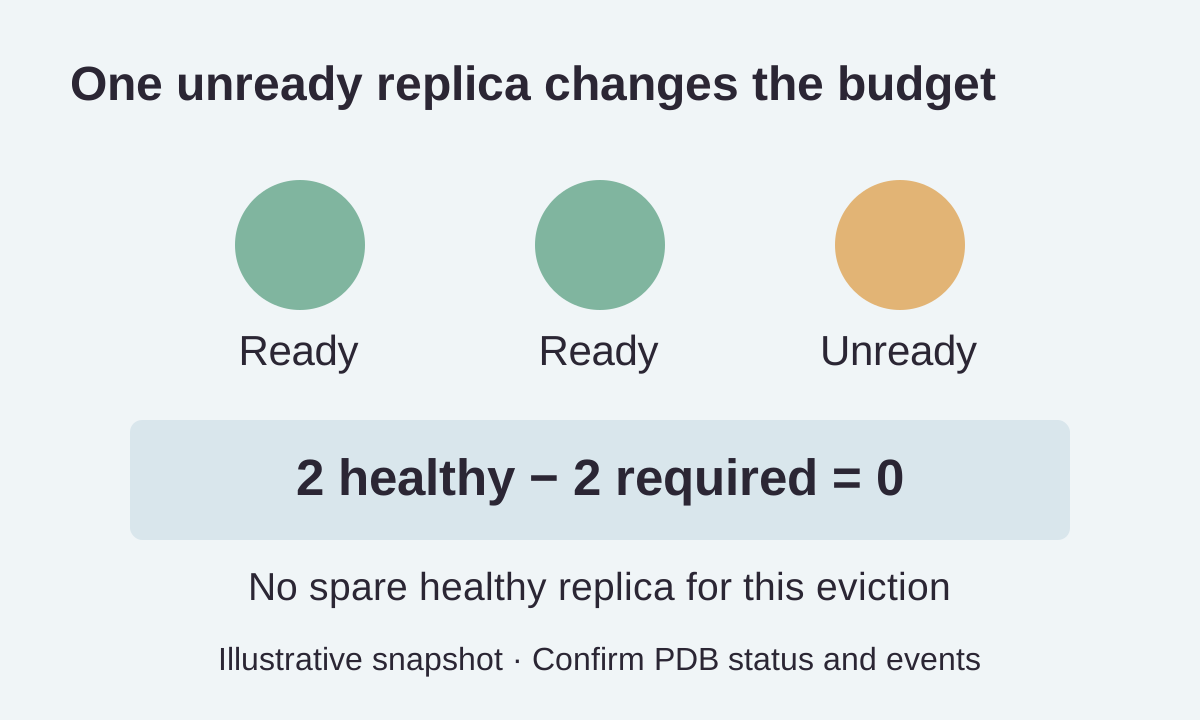
Now suppose one replica is already unready. The service may have only two healthy replicas before maintenance begins. The budget can correctly deny another healthy pod's eviction. The operator's task is to understand the unhealthy replica, not assume the budget was configured incorrectly because the maintenance window is open.
Inspect currentHealthy, desiredHealthy, and disruptionsAllowed in PDB status alongside the actual pod state. A zero allowance is a result to explain. Recent accepted disruptions and controller observation can affect the view, so capture the state and events instead of treating one counter as a complete diagnosis.
apiVersion: policy/v1
kind: PodDisruptionBudget
metadata:
  name: demo-api-budget
spec:
  minAvailable: 2
  selector:
    matchLabels:
      app: demo-api
Illustrative budget for a replicated workload whose pod labels match app: demo-api. The three-replica scenario is an example, not a universal availability recommendation.
Check the replacement pod's path to readiness
A deployment can request a replacement without finding a place to run it. Review available node resources, placement rules, taints, tolerations, storage attachment constraints, and events. A PDB cannot create the capacity or topology that a replacement needs.
For the example, imagine the two remaining nodes have no room for the API's memory request. Eviction of one pod may leave a pending replacement and prevent further progress. Reducing the budget would not solve the missing capacity. The team needs a supported way to add capacity or change the placement constraint without undermining the application requirement.
A running pod can still be unready. Inspect health checks and dependency availability, and determine whether the readiness signal represents the service's real ability to accept work. A database problem can keep every new replica unready even when node resources are plentiful. Fixing scheduling alone would not resolve that case.
Separate the budget from termination behavior
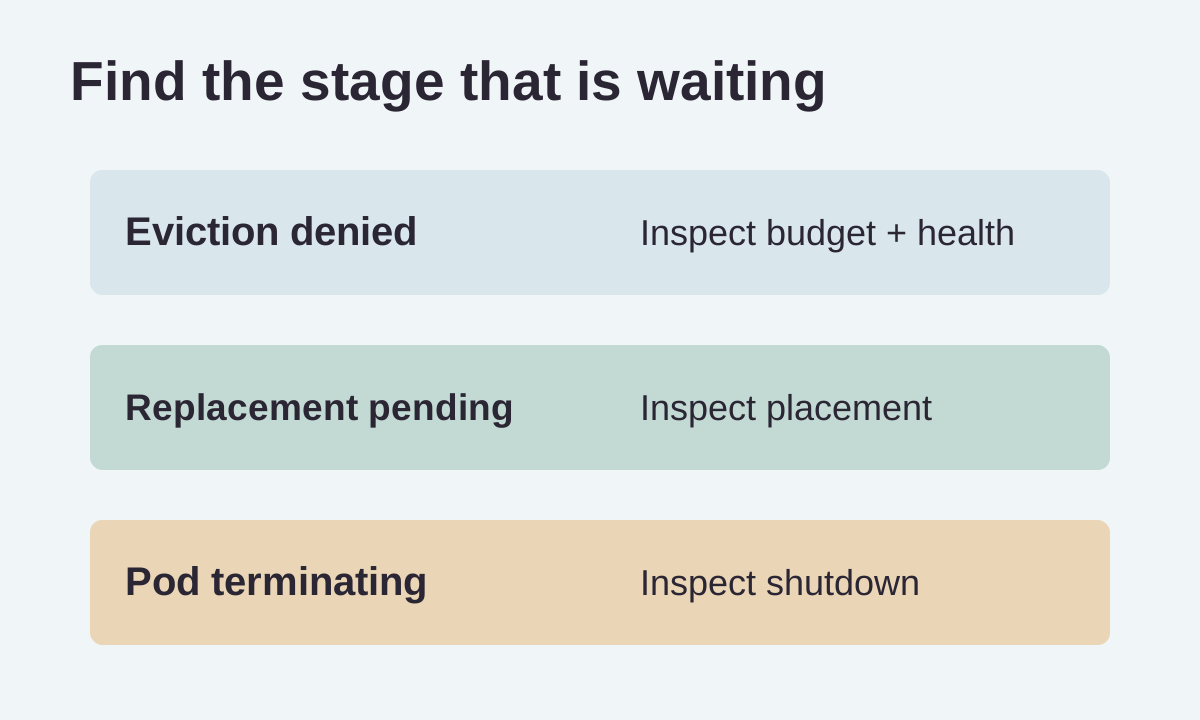
After eviction is allowed, a pod may take time to stop. Inspect its deletion state, termination grace period, shutdown behavior, and relevant events. A long termination is a different stage from an eviction rejected before shutdown begins.
Applications should handle shutdown according to their workload. A request-serving API may need to stop accepting new work and complete bounded in-flight operations. A worker may need to return or finish a message safely. The exact procedure belongs to the application and its dependencies.
Use the rehearsal to measure whether the chosen grace period fits actual shutdown. A very long period can delay maintenance, while abrupt termination can leave incomplete work or customer errors. Record which stage consumed the time so a later operator does not try to solve every slow drain by changing the PDB.
Understand percentage rounding and small workloads
Percentage-based budgets require care when the replica count is small. Kubernetes documents how it rounds values, and the rounded allowance can differ from an operator's informal intuition. Before maintenance, calculate the result for the actual workload size and confirm it against observed status.
For a small API, an explicit count can sometimes make the intended condition easier to review. That is a design choice, not a general rule that percentages are wrong. The important question is whether the team understands what happens when the desired replica count changes.
Review autoscaling and deployment behavior with the application owner. A budget that is sensible at six replicas may be impossible to satisfy at one. A single-replica service that must always remain available needs a broader availability discussion. A configuration object cannot remove that underlying trade-off.
Treat unhealthy-pod eviction as an explicit policy
Kubernetes supports an unhealthyPodEvictionPolicy with documented behavior for unhealthy running pods. Review its supported values and the version used by your cluster before changing it. The default behavior and an AlwaysAllow policy express different maintenance trade-offs.
Allowing an unhealthy pod to leave can help a drain progress in some scenarios. It does not make the application healthy, guarantee a replacement, or authorize arbitrary disruption of healthy replicas. Evaluate the policy with readiness behavior, placement, and workload recovery in mind.
For the API rehearsal, include one intentionally unhealthy sandbox pod and observe the expected eviction behavior under the selected policy. Keep that test separate from a fully healthy workload. The operator should know which condition the setting addresses and which problems still require application or capacity work.
Do not confuse drain flags with application availability
Drain has options for different workload and storage situations. Read the exact command help and cluster guidance before choosing them. A flag that permits handling an unmanaged pod does not mean the operation has become safe for the service.
In particular, bypassing the eviction API can bypass PDB protection. Direct deletion and some other disruption paths are not constrained in the same way as supported voluntary eviction. Treat such a change as an explicit operational decision with the application owner, rather than a routine way to clear a command.
Keep a runbook that identifies when to stop and escalate. The useful evidence includes the affected service, healthy capacity, replacement state, remaining work, and expected consequence of interruption. A planned maintenance window is not itself proof that every workload can tolerate forced termination.
Rehearse the upgrade on a bounded workload
Use a non-production or otherwise authorized maintenance environment that represents the relevant placement and availability constraints. A cluster with abundant spare capacity can hide a problem that appears in a tightly packed production node pool.
Test one node at a time and observe the full sequence. Can the eviction proceed, can a replacement schedule, does it become ready, and does the service remain usable? Include a synthetic request or job that represents the application's meaningful work, with no real external effects.
After the rehearsal, record the PDB status, workload configuration, spare-capacity assumptions, and observed timings. If production differs, call out the difference. A successful test proves behavior under the stated conditions, not an unconditional promise that every later drain will be uneventful.
Decide on the narrowest corrective action
If a replica is unhealthy, investigate its failure. If a replacement is pending, resolve its scheduling constraint. If termination is slow, inspect shutdown behavior. If the budget does not express the agreed service requirement, review the budget with the owner and test the revised policy.
Avoid changing several controls simultaneously. Increasing replicas, weakening a budget, altering placement, and shortening grace periods at once can make a drain finish without revealing which change was necessary. A later maintenance operation may fail again because the team never identified the real boundary.
Record temporary exceptions and remove them through the normal process after the maintenance goal is achieved. The final configuration should represent the service's ongoing requirement. A one-time workaround left in place can quietly change availability during future upgrades or scale-down activity.
Use a maintenance checklist with a stop condition
Before draining, identify the application owner, confirm replica health, inspect the matching PDB, and establish that replacement capacity is plausible. Check the expected shutdown path and define what evidence will cause the operator to pause.
During the drain, distinguish a rejected eviction from a pending replacement and a terminating pod. Monitor the user-facing service condition alongside infrastructure status. An operation can make progress in the node pool while exposing a workload problem that deserves a stop.
Afterward, verify the replacement workload and remove temporary changes. Keep the observation in the runbook. A dependable node-maintenance process follows availability from eviction through recovery, with a clear explanation when the safest action is to wait.